Eric Albach
I just found a snippet design re-use method that is quite reasonable. Basically, append a question mark to the designators and create the snippets. Place the snippets in the new schamatic and PCB. Link the components between the schematic and PCB. Use Annotate Schematics Quietly. Update the PCB.
It's pretty easy. With this method it takes less than a minute to add a fully linked and annotated design. I used to spend a lot more time.
From the original schematic and PCB:
Update and Link the components between the schematic and PCB
Select the schematic section
Use SCH Inspector set to include only parts and use Smart Edit Formula on designators to append with a question mark.
Example formula : !+'?'
ends up with R12? (leaving the numbers keeps the components linkable and the question mark allows quiet annotation)
Update the PCB with the new designators
Create the schematic and PCB snippets
In the new schematic and PCB:
Place the snippets
Link the components using Project > Component Links > Add Pairs Matched by Designator
Use Annotate Schematics Quietly
Update the PCB
Source https://forum.live.altium.com/posts/221757/645999
Rich Betz
When you paste PCB snippets, be careful with existing 'ON' Planes. Your via's can and will connect to the first plane they contact, throwing your net connections all out of whack.
Either turn off all of your Plane Layers before you place the snippet, or place it outside the board outline until you get all of your component net connections linked up correctly.
When you get your Sch/Pcb component pin nets all linked up with All Layers On, select the whole snippet area.
Use PCB Filter (IsSelected and (IsVia or IsTrack)) to filter out the parts but hold on to all the connections.
Then CUT the connections with reference to Pin1 somewhere in the snippet,
Then Paste right back in the same place. All tracks and via's will adopt NetName from component pin nets.
Then... you can turn your Planes back on and position the snippet where you want it.
Source: https://forum.live.altium.com/posts/221757/646088
Eric Albach
Possibly the best method for the PCB side is to keep "snippets" in a PcbDoc then you can select, copy and paste special with Keep Net Name. That way you won't lose the polygon pour nets.
Source: https://forum.live.altium.com/posts/221757/646099
Tuesday, May 30, 2017

TrueType Fonts in PDFs
Workaround:
"Open the file in real adobe acrobat or the viewer rotate the pages and then rotate them back and then save. Files can now be saved. Doing this probably removes the bug that Thomas mentions and puts it back to the correct standard."
Source: Altium Ideas
"Open the file in real adobe acrobat or the viewer rotate the pages and then rotate them back and then save. Files can now be saved. Doing this probably removes the bug that Thomas mentions and puts it back to the correct standard."
Source: Altium Ideas
Sunday, May 28, 2017
Delphi File Basics
function Read_ini(junk:string):boolean;
var
folderName : string;
fileName : string;
myFile : TextFile;
data : string;
begin
//showmessage (Board.FileName);
//showmessage (PCBServer.GetCurrentPCBBoard.FileName);
//showmessage (ExtractFilePath(Application.ExeName));
//showmessage (ClientAPI_SpecialFolder_AltiumApplicationData);
// For ini file Saved in Project Folder
FileName := (ExtractFilePath(Board.FileName))+ 'Designators.ini';
// Global ini file
if Not FileExists(FileName) then
begin
// Try to open a text file for writing to
folderName := ExtractFilePath(ClientAPI_SpecialFolder_AltiumApplicationData) + 'Scripts\';
CreateDir (folderName);
FileName := folderName + 'Designators.ini';
end;
//showmessage (FileName);
if FileExists(fileName) then
begin
AssignFile(myFile, fileName);
// Reopen the file in read mode
Reset(myFile);
// Read the file contents
//while not Eof(myFile) do
//begin
//ShowMessage(data);
if not Eof(myFile) then ReadLn(myFile, data);
EditMinHeight.Text:= data;
if not Eof(myFile) then ReadLn(myFile, data);
EditMaxHeight.Text:= data;
if not Eof(myFile) then ReadLn(myFile, data);
EditCommentsTop.Text:= data;
if not Eof(myFile) then ReadLn(myFile, data);
EditCommentsBot.Text:= data;
if not Eof(myFile) then ReadLn(myFile, data);
EditTestPointsTop.Text:= data;
if not Eof(myFile) then ReadLn(myFile, data);
EditTestPointsBot.Text:= data;
//end;
CloseFile(myFile);
result := True
end;
// Debug Code
// Now see if the file exists
// if FileExists(fileName)
// then ShowMessage(fileName+' exists OK')
// else ShowMessage(fileName+' does not exist');
// Delete the file and look again
// DeleteFile(fileName);
// if FileExists(fileName)
// then ShowMessage(fileName+' still exists!')
// else ShowMessage(fileName+' no longer exists');
end;
function Write_ini(junk:string):boolean;
var
folderName : string;
fileName : string;
myFile : TextFile;
begin
// Open a text file for writing to
// For .ini files Saved in Project Folder
fileName := (ExtractFilePath(Board.FileName)) + 'Designators.ini';
AssignFile(myFile, fileName);
ReWrite(myFile);
Write(myFile, EditMinHeight.Text + #13#10);
Write(myFile, EditMaxHeight.Text + #13#10);
Write(myFile, EditCommentsTop.Text + #13#10);
Write(myFile, EditCommentsBot.Text + #13#10);
Write(myFile, EditTestPointsTop.Text + #13#10);
Write(myFile, EditTestPointsBot.Text + #13#10);
CloseFile(myFile);
// Global ini file
if Not FileExists(fileName) then
begin
folderName := ExtractFilePath(ClientAPI_SpecialFolder_AltiumApplicationData) + 'Scripts\';
CreateDir (folderName);
fileName := folderName + 'Designators.ini';
AssignFile(myFile, fileName);
//DeleteFile(fileName);
ReWrite(myFile);
Write(myFile, EditMinHeight.Text + #13#10);
Write(myFile, EditMaxHeight.Text + #13#10);
Write(myFile, EditCommentsTop.Text + #13#10);
Write(myFile, EditCommentsBot.Text + #13#10);
Write(myFile, EditTestPointsTop.Text + #13#10);
Write(myFile, EditTestPointsBot.Text + #13#10);
CloseFile(myFile);
end;
end;
Debug Code
// See if the file exists
// if FileExists(fileName)
// then ShowMessage(fileName+' exists OK')
// else ShowMessage(fileName+' does not exist');
// Delete the file and look again
// DeleteFile(fileName);
// if FileExists(fileName)
// then ShowMessage(fileName+' still exists!')
// else ShowMessage(fileName+' no longer exists');
Related Links:
Delphi Basics : Files
var
folderName : string;
fileName : string;
myFile : TextFile;
data : string;
begin
//showmessage (Board.FileName);
//showmessage (PCBServer.GetCurrentPCBBoard.FileName);
//showmessage (ExtractFilePath(Application.ExeName));
//showmessage (ClientAPI_SpecialFolder_AltiumApplicationData);
// For ini file Saved in Project Folder
FileName := (ExtractFilePath(Board.FileName))+ 'Designators.ini';
// Global ini file
if Not FileExists(FileName) then
begin
// Try to open a text file for writing to
folderName := ExtractFilePath(ClientAPI_SpecialFolder_AltiumApplicationData) + 'Scripts\';
CreateDir (folderName);
FileName := folderName + 'Designators.ini';
end;
//showmessage (FileName);
if FileExists(fileName) then
begin
AssignFile(myFile, fileName);
// Reopen the file in read mode
Reset(myFile);
// Read the file contents
//while not Eof(myFile) do
//begin
//ShowMessage(data);
if not Eof(myFile) then ReadLn(myFile, data);
EditMinHeight.Text:= data;
if not Eof(myFile) then ReadLn(myFile, data);
EditMaxHeight.Text:= data;
if not Eof(myFile) then ReadLn(myFile, data);
EditCommentsTop.Text:= data;
if not Eof(myFile) then ReadLn(myFile, data);
EditCommentsBot.Text:= data;
if not Eof(myFile) then ReadLn(myFile, data);
EditTestPointsTop.Text:= data;
if not Eof(myFile) then ReadLn(myFile, data);
EditTestPointsBot.Text:= data;
//end;
CloseFile(myFile);
result := True
end;
// Debug Code
// Now see if the file exists
// if FileExists(fileName)
// then ShowMessage(fileName+' exists OK')
// else ShowMessage(fileName+' does not exist');
// Delete the file and look again
// DeleteFile(fileName);
// if FileExists(fileName)
// then ShowMessage(fileName+' still exists!')
// else ShowMessage(fileName+' no longer exists');
end;
function Write_ini(junk:string):boolean;
var
folderName : string;
fileName : string;
myFile : TextFile;
begin
// Open a text file for writing to
// For .ini files Saved in Project Folder
fileName := (ExtractFilePath(Board.FileName)) + 'Designators.ini';
AssignFile(myFile, fileName);
ReWrite(myFile);
Write(myFile, EditMinHeight.Text + #13#10);
Write(myFile, EditMaxHeight.Text + #13#10);
Write(myFile, EditCommentsTop.Text + #13#10);
Write(myFile, EditCommentsBot.Text + #13#10);
Write(myFile, EditTestPointsTop.Text + #13#10);
Write(myFile, EditTestPointsBot.Text + #13#10);
CloseFile(myFile);
// Global ini file
if Not FileExists(fileName) then
begin
folderName := ExtractFilePath(ClientAPI_SpecialFolder_AltiumApplicationData) + 'Scripts\';
CreateDir (folderName);
fileName := folderName + 'Designators.ini';
AssignFile(myFile, fileName);
//DeleteFile(fileName);
ReWrite(myFile);
Write(myFile, EditMinHeight.Text + #13#10);
Write(myFile, EditMaxHeight.Text + #13#10);
Write(myFile, EditCommentsTop.Text + #13#10);
Write(myFile, EditCommentsBot.Text + #13#10);
Write(myFile, EditTestPointsTop.Text + #13#10);
Write(myFile, EditTestPointsBot.Text + #13#10);
CloseFile(myFile);
end;
end;
Debug Code
// See if the file exists
// if FileExists(fileName)
// then ShowMessage(fileName+' exists OK')
// else ShowMessage(fileName+' does not exist');
// Delete the file and look again
// DeleteFile(fileName);
// if FileExists(fileName)
// then ShowMessage(fileName+' still exists!')
// else ShowMessage(fileName+' no longer exists');
Related Links:
Delphi Basics : Files
Thursday, May 25, 2017
Track Coordinates X1,Y1 and X2,Y2
In Altium Track Coordinates are in mils x 10,000
click on image to view
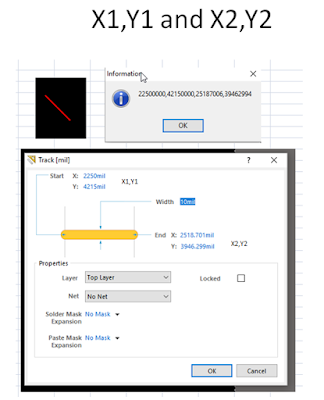
click on image to view

Notes:
X1 is always less than X2.
Y1 can be less than or greater than Y2, it depends on the angle of the track and the starting location of the X axis.
That's it !
X1 is always less than X2.
Y1 can be less than or greater than Y2, it depends on the angle of the track and the starting location of the X axis.
That's it !
Monday, May 22, 2017
Find Dead Copper
Query to select all dead copper for deletion:
Modified Query - I added And NOT (Keepout = 'True')
(((((ObjectKind = 'Track') OR (ObjectKind = 'Arc')) And OnSignal)) Or IsVia) And NOT InAnyNet And Not InAnyComponent And NOT (Keepout = 'True')
Source Dennis Saputelli
https://forum.live.altium.com/#posts/221702/645693
That's it !
Modified Query - I added And NOT (Keepout = 'True')
(((((ObjectKind = 'Track') OR (ObjectKind = 'Arc')) And OnSignal)) Or IsVia) And NOT InAnyNet And Not InAnyComponent And NOT (Keepout = 'True')
Source Dennis Saputelli
https://forum.live.altium.com/#posts/221702/645693
That's it !
Subscribe to:
Posts (Atom)