Showing posts with label Rooms. Show all posts

Thursday, February 1, 2024

Room - Donut Shaped with Height Constraint

Example - Donut Shaped Room with Height Constraint

Height Constraint using Keep Objects Outside

Create two Arcs with Crosshairs.

Draw Rectangular Room, ignore self-intersecting warnings while drawing the polygon. Then Edit Polygon Room Vertices to form joined 90 degree Arcs using Snap to Lines and Arcs. 

or

Draw Lines and Arcs then Tools > Convert > Create Room From Selected Primitives.

Notes:

Height Constraint Syntax -  AsMM(Height) > 0.6

Height Constraint - Online DRC does NOT work (bug ?)

Height Constraint - Batch Mode DRC Check works.

Use Shift + Space Bar to Pull Lines to Arcs.

Friday, May 1, 2020

Get a Room !


Rooms can be combined with Filters to Copy and Paste selected primitives. 

Example:

click on image to view


(WithinRoom('CPU') And OnBottom) And (InPolygon Or IsTrack) And InAnyNet


Example 2: Vias and Copper Features On Top Layer

(WithinRoom('CPU') And IsVia) OR (OnTopLayer And NOT InAnyComponent AND WithinRoom('CPU'))

That's it !

Thursday, August 18, 2016

Rooms - Transparency

Here's a teaser. . . 

What's looks like a bunch of shorted nets?


Its a room !


This occurs when the Transparency setting is 0% for the rooms.

Fix: Change View Options > Transparency for Rooms to 60%


That's It !

Tuesday, August 26, 2014

Rooms - For Clearance Exceptions

Rooms are useful for creating exceptions. 

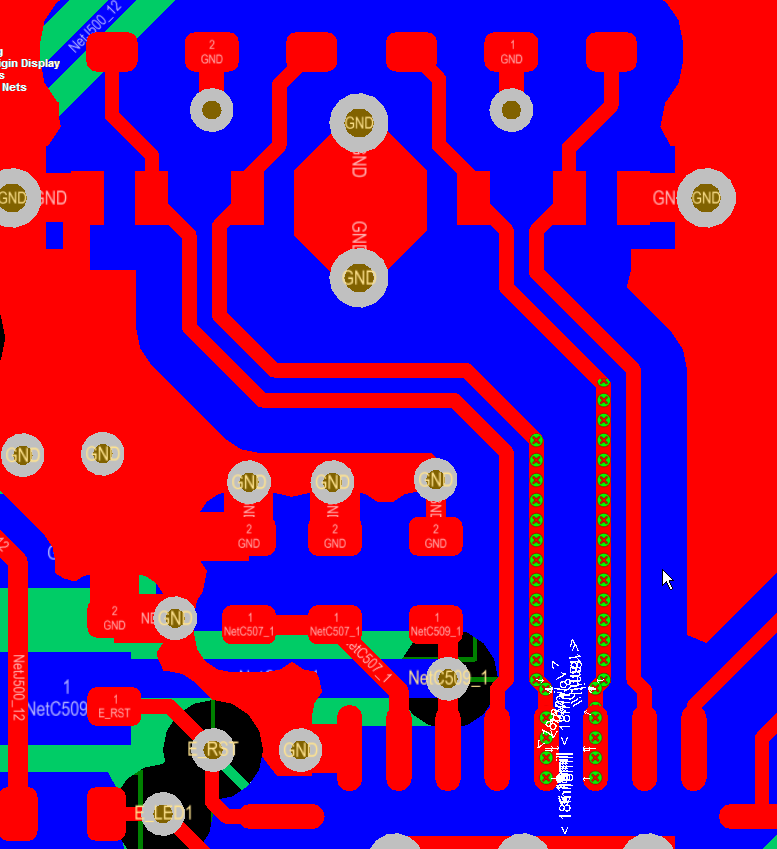
For example this Ethernet design called for 18 mils of clearance from the differential pairs to adjacent copper pours.

The diff pair nets were placed in class and a clearance rule was created to hold polygon pours back 18 mils.

click on images to view


This took care of the 18 mil (~3 x W) copper clearance requirement.


However as shown above, now there is a clearance error where the differential pairs connect to U500.

We can use a room to define a clearance exception for the differential pair at U500.

Define the Room

Design > Rooms


Tip: Use Shift + Click to Select an Existing Room

Tip: Select a handle on the Room > Drag Handle > Tab Key

Take note of the settings used for the room above, specifically:

Name RX_TX_ROOM

Not InComponent('U500') 

'Keep Objects Outside' 


Clearance Rule


That's It.

Monday, July 8, 2013

Design Rules - Rooms with Neck Downs

Using Rooms with Design Rules to solve Clearance Violations


Design > Rooms > Place Room > InComponentClass('xxx ')  . . . 


Create a Clearance Rule for the Room


Set Priority


Stop Removing Rooms

Project > Project Options > ECO Generation Tab > Remove Rooms > Ignore Differences.


Or 

Under the Comparator Tab > Extra Room Definitions > Ignore Differences


Another Room Definition Example


Tuesday, February 19, 2013

Generate Rooms

To enable or disable Rooms from being Generated.


Friday, June 22, 2012

Rooms - Stop Removing Rooms

To stop Rooms from being removed when updating the PCB from the schematic.

Project Options > ECO Generation > Remove Rooms > Ignore Differences


or 

Under the Comparator Tab > Extra Room Definitions > Ignore Differences