Using Run Process in a script you can execute PCB commands.
I created a Delphi script which was running properly in both 2D and 3D modes with older versions of DXP (before AD18). After DXP migrated to 64bit the script would only run when the PCB was in the 2D view. I needed to add line of code to my script to switch from the 3D view to 2D.
Recently I learned to use RunProcess to execute PCB Commands in my scripts.
Example: To switch the PCB from 3D view to 2D view.
RunProcess ('PCB:Swithto2D') / / Delphi Script Code
RunProcess "PCB:Swithto2D" ' VbScript Code
Link to Altium PCB Commands:
PCB Commands | Online Documentation for Altium Products
That's it !
Showing posts with label Scripts. Show all posts
Showing posts with label Scripts. Show all posts
Thursday, February 28, 2019

Saturday, April 29, 2017
Delphi Trigonometry
Delphi Trigonometry: Useful for PCB Scripts.
Intersection of two straight lines - Online Simulation

Simulation Source: Math open Reference
Delphi code to Get Angle
const
RADIANS=57.29577951;
// If Angle is outside of 0-360 then put it within 0-360
function FixAngle(angle:double):double;
begin
while angle>= 360.0 do
angle := angle - 360.0;
while angle < 0 do
angle := angle + 360.0;
result:=angle;
end;
// Angle going from x1,y1 to x2,y2
function GetAngleDegrees(x1,y1,x2,y2:double):double;
var
part1, part2:double;
angle:double;
begin
if (x1=x2) and (y1=y2) then
begin
result:=0.0;
exit;
end;
part1:=abs(y2-y1);
if (part1=0) then begin part1:=0.0000001; y1:=y1+0.0000001; end;
part2:=abs(x2-x1);
if (part2=0) then begin part2:=0.0000001; x1:=x1+0.0000001; end;
angle:=arctan(part1/part2)*RADIANS;
if ((x1>x2) and (y1<y2)) then angle:=180-angle;
if ((x1>x2) and (y1>y2)) then angle:=angle +180;
if ((x1<x2) and (y1>y2)) then angle:=360-angle;
angle:=FixAngle(angle);
result:=angle;
end;
'via Blog this'
Intersection of two straight lines - Online Simulation

Simulation Source: Math open Reference
Delphi code to Get Angle
const
RADIANS=57.29577951;
// If Angle is outside of 0-360 then put it within 0-360
function FixAngle(angle:double):double;
begin
while angle>= 360.0 do
angle := angle - 360.0;
while angle < 0 do
angle := angle + 360.0;
result:=angle;
end;
// Angle going from x1,y1 to x2,y2
function GetAngleDegrees(x1,y1,x2,y2:double):double;
var
part1, part2:double;
angle:double;
begin
if (x1=x2) and (y1=y2) then
begin
result:=0.0;
exit;
end;
part1:=abs(y2-y1);
if (part1=0) then begin part1:=0.0000001; y1:=y1+0.0000001; end;
part2:=abs(x2-x1);
if (part2=0) then begin part2:=0.0000001; x1:=x1+0.0000001; end;
angle:=arctan(part1/part2)*RADIANS;
if ((x1>x2) and (y1<y2)) then angle:=180-angle;
if ((x1>x2) and (y1>y2)) then angle:=angle +180;
if ((x1<x2) and (y1>y2)) then angle:=360-angle;
angle:=FixAngle(angle);
result:=angle;
end;
'via Blog this'
Thursday, April 20, 2017
Scripting - Online Documentation for Altium
Script Examples Reference | Online Documentation for Altium Products
System API Low-level Routines (i.e. Hourglass, Esckey):
Using the PCB API
IPCB_SystemOptions (DXP Preferences)
PCB API System Interfaces | Online Documentation for Altium Products
PCB API System Interface References (example scripts)
System API Low-level Routines (i.e. Hourglass, Esckey):
Using the PCB API
IPCB_SystemOptions (DXP Preferences)
PCB API System Interfaces | Online Documentation for Altium Products
PCB API System Interface References (example scripts)
Monday, November 28, 2016
Script - MechanicalReMapper.pas v1.04 - Altium Discussion Forums
Script - MechanicalReMapper.pas v1.04 - Altium Discussion Forums:
"This version has a known bug with the PCB Layer Pairs. So if you have them in a PCB, check that they are still correct after running the script. No other bugs are known."
'via Blog this'
"This version has a known bug with the PCB Layer Pairs. So if you have them in a PCB, check that they are still correct after running the script. No other bugs are known."
'via Blog this'
Wednesday, July 29, 2015
Sunday, March 22, 2015
How to Install an Altium Script
Install the Script
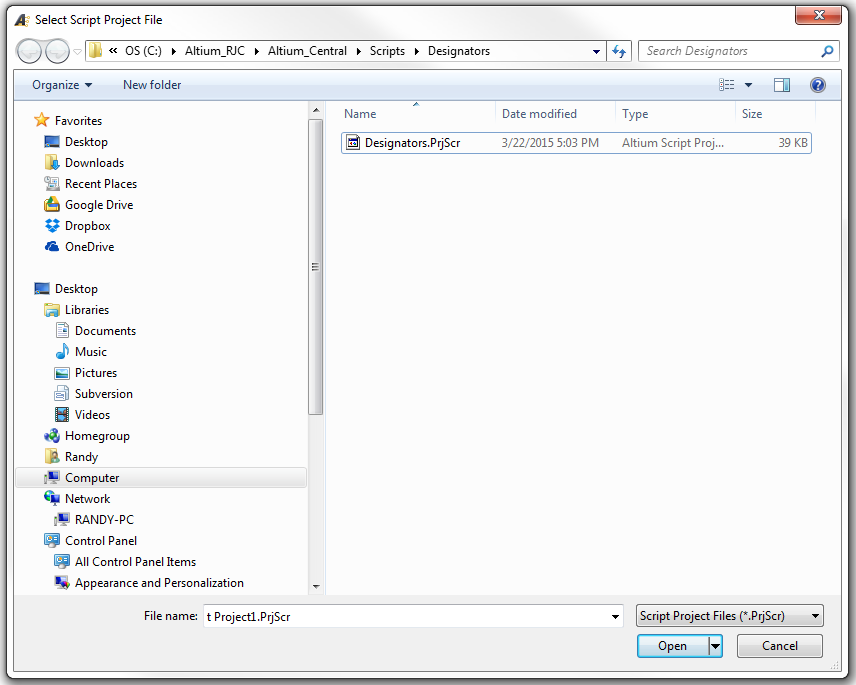
If you run a script often you may want to add the script to your DXP Preferences.
DXP > Preferences > Scripting System > Global Projects > Install
Select the Script > Open > Ok
click on image to view
Run a PCB Script
With a *.PcbDoc open and in view, select DXP > Run Script

Select Script to Run

That's It !
If you run a script often you may want to add the script to your DXP Preferences.
DXP > Preferences > Scripting System > Global Projects > Install
Select the Script > Open > Ok
click on image to view
Run a PCB Script
With a *.PcbDoc open and in view, select DXP > Run Script
Select Script to Run
That's It !
Wednesday, April 2, 2014
Building Script Projects - Altium Tutorial
Good starting point to learn Scripts
http://www.altium.com/files/learningguides/tu0125_buildingscriptprojects.pdf
'via Blog this'
http://www.altium.com/files/learningguides/tu0125_buildingscriptprojects.pdf
'via Blog this'
Wednesday, October 16, 2013
Measuring code performance in Delphi Scripts
First step in code optimization is to determine which procedures in our code need to be optimized.
A millisecond timer is needed to test for the elapsed time required to execute the code.
On a Windows Machine we can use 'GetTickCount'. Below is a code snippet for Delphi.
procedure TForm1.ButtonClick(Sender: TObject);
var
startTick : DWord;
delta : DWord;
begin
startTick := GetTickCount;
DoSomething; // Your Code
delta := GetTickCount - startTick;
ShowMessage(IntToStr(delta) + 'ms');
end;
See what CapnBry has to say about GetTickCount:
'via Blog this'
A millisecond timer is needed to test for the elapsed time required to execute the code.
On a Windows Machine we can use 'GetTickCount'. Below is a code snippet for Delphi.
procedure TForm1.ButtonClick(Sender: TObject);
var
startTick : DWord;
delta : DWord;
begin
startTick := GetTickCount;
DoSomething; // Your Code
delta := GetTickCount - startTick;
ShowMessage(IntToStr(delta) + 'ms');
end;
See what CapnBry has to say about GetTickCount:
'via Blog this'
Wednesday, October 2, 2013
Sunday, September 8, 2013
Altium Script - Via Soldermask Barrel Relief
Updated Via Soldermask Barrel Relief (9-11-2013 11-24-56 AM)
PCB fabricators may request permission to apply Soldermask Barrel Reliefs to your tented vias when the via's hole sizes are 18mil or larger in size. Consult with your fabricator as the requirements vary between suppliers.
For more about Soldermask Barrel Reliefs see : Via Barrel Reliefs - PCB Designer Blog

Fabricators specify the barrel reliefs with respect to the via hole size. For example drill hole size + 5mil is typical.
The +5mil soldermask relief accounts for registration and process tolerances.

To Force Complete Tenting
Tenting vias on one side can trap chemicals and fluxes in the via barrels which can corrode away the copper plating in the via barrels. This is a reliability issue.
Reference: Soldermask on via-holes in case of chemical Nickel-Gold surface finish
PCB fabricators may request permission to apply Soldermask Barrel Reliefs to your tented vias when the via's hole sizes are 18mil or larger in size. Consult with your fabricator as the requirements vary between suppliers.
For more about Soldermask Barrel Reliefs see : Via Barrel Reliefs - PCB Designer Blog

Fabricators specify the barrel reliefs with respect to the via hole size. For example drill hole size + 5mil is typical.
The +5mil soldermask relief accounts for registration and process tolerances.

To Force Complete Tenting
Tenting vias on one side can trap chemicals and fluxes in the via barrels which can corrode away the copper plating in the via barrels. This is a reliability issue.
Reference: Soldermask on via-holes in case of chemical Nickel-Gold surface finish
Friday, May 31, 2013
Scripts - Server Processes Reference
Shown below is a simple Delphi Script I created to break all Component Groups in a PCB.
// Break All Component Groups
// Randy Clemmons
Var
Board : IPCB_Board;
Procedure Start;
begin
Board := PCBServer.GetCurrentPCBBoard;
if Board = nil then
begin
ShowMessage('Active Window is Not a .PcbDoc File');
exit;
end;
// http://wiki.altium.com/display/ADOH/PCB+Processes
// Examples
// Process: PCB:GroupPrimitives
// Parameters: Action=BreakAllComponentUnions
// Parameters: Action=Explode | Object=ALL
AddStringParameter('Action','BreakAllComponentUnions');
RunProcess('PCB:GroupPrimitives');
end;
Modifying Schematic Objects (Altium Forum)
// Break All Component Groups
// Randy Clemmons
Var
Board : IPCB_Board;
Procedure Start;
begin
Board := PCBServer.GetCurrentPCBBoard;
if Board = nil then
begin
ShowMessage('Active Window is Not a .PcbDoc File');
exit;
end;
// http://wiki.altium.com/display/ADOH/PCB+Processes
// Examples
// Process: PCB:GroupPrimitives
// Parameters: Action=BreakAllComponentUnions
// Parameters: Action=Explode | Object=ALL
AddStringParameter('Action','BreakAllComponentUnions');
RunProcess('PCB:GroupPrimitives');
end;
Modifying Schematic Objects (Altium Forum)
To modify Schematic objects on a current Schematic document, you will need to invoke certain methods in a particular order to ensure the Undo/Redo system is up to date when a schematic object’s attributes have been modified programmatically.
The sequence is as follows:
- Invoke the
PreProcessmethod which initialize the robots in the schematic server - Send a
SCHM_BeginModifymessage - Modify the Schematic object by changing its attributes (Properties)
- Send a
SCHM_EndModifymessage - Invoke the
PostProcessmethod to clean up the robots in the Schematic server.
Wednesday, May 22, 2013
Script - Run with Shortcut Key
C:\Altium_RJC\Altium_Central\Scripts\Fix_Connections_v1.0\Fix_Connections.PrjScr

Create New or Edit a Custom Shortcut Key (Hotkey)
Right Click on Main Toolbar > Customize > [Custom]

Example Settings

Process:
ScriptingSystem:RunScript
Parameters:
ProjectName=C:\Altium_RJC\Altium_Central\Scripts\Fix_Connections_v1.0\Fix_Connections.PrjScr|ProcName=Fix_Connections.pas>Start
Shortcuts:
Assign Primary Key to run the Script.
Tip: Edit existing menu short cuts by holding down Ctrl + Select Menu Button
Bitmap Icons (18 x 18 pixels) can be added to the toolbar.
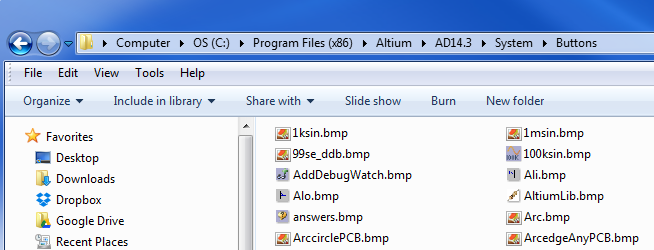
Tip: Edit existing menu short cuts by holding down Ctrl + Select Menu Button
Bitmap Icons (18 x 18 pixels) can be added to the toolbar.
That's It . . .
Saturday, December 29, 2012
Scripts - Reference Manuals

Friday, June 8, 2012


Subscribe to:
Posts (Atom)