Showing posts with label Nuggets. Show all posts

Thursday, February 13, 2014

DDRx Routing Tips - Part 1

When routing DDRx with Altium you need to use some clever tricks or third party tools to get the job done.  

Altium Bug Crunch #960: Altium Live Log in Required

Currently your options include:

  1. Using Net Ties.
  2. Manually measuring trace segments.
  3. Exporting nets to Hyperlynx.
  4. Use Net Length Tool.

Net Ties

Net ties are workarounds used by get better net length data from Altium.

When using net ties you should be prepared to get a notice from your fabricator that your design has shorted nets.  To avoid an unexpected call you should identify the shorted nets in the design for your fabricator in a read me file.

"This type of component allows two (or more) nets to be connected together, for example a digital ground and an analog ground that must be connected at a specific location on the schematic and in the PCB routing. They are always synchronized to the PCB and are always included in the BOM. Use this Type of Net Tie if a jumper type component is to be fitted as part of the assembly process. When placing components of this Type, use the Verify Shorting Copper option in the Design Rule Checker dialog when performing a DRC in the PCB, to verify the short correctly exists."

Source: http://techdocs.altium.com/display/ADRR/Sch_Obj-Part((Part))_AD


Below is a two pin Net Tie that has been optimized for a DDRx project. This Net Tie is used instead of VIAs in the design to connect nets to termination resistors.


Schematic Symbol for a Net Tie with two pins.


Net Tie Footprint with two overlapping pads.


3D View of the above Net Tie


Example Routing


Note the net names for DDR3_A9_3 and DDR3_T_A9_3.

This removes the trace length of (DDR3_T_A9_3) for the termination connection from the net (DDR3_A9_3) leaving us with the Net length from the memory controller to the memory chip.


See Altium Addons for a nice library of Net Ties created by Petr Tosovsky.

Net-ties along with some clever routing tricks can improve the length data displayed in the PCB Panel.


Here is one example of a clever trick to simplify determining the Net length when you have a series resistor in the signal path. 


By temporarily placing a short across a resistor in the schematic we can get the total Net length for a trace in the PCB Panel from the transmitting IC to the receiving IC.


Download Lib_NetTieLib


Manual Measurements

To verify net length data displayed in the PCB panel users check trace lengths manually.


Track segments are selected along the path of interest, then the R, S keys are pressed to display the length of the selected trace segments.


Some users go to great lengths (that's was a pun) to verify every critical trace length manually. This can be done by entering measured Net data in a spreadsheet.


For an example of using measured Nets and a spreadsheet see:
Altium Designer - DDR2 / DDR3 Length Matching on You Tube - Robert Feranec 

Export to Hyperlynx


When exporting a Hyperlynx file from later versions of Altium you will get an error message if you have shelved polygons in the design.


To avoid seeing this message you may want to leave your polygons un-shelved (poured) and use the view option to hide the polygons while routing your board.


To use Hyperlynx refer to Mentor Graphics documentation. 

Setting up and using Hyperlynx is WAY beyond the scope of this article.


Related Links:

DDR3 Routing - Simplified Part 1
DDR3 Routing - Simplified Part 2


Until next time.

Best regards,
Randy

Saturday, October 12, 2013

DDR3 Routing - Simplified Part 2

DDR3 Routing - Simplified Part 1 

Part two of this series covers net length measurements and methods to ensure your matched length routes are properly implemented in Altium.

We will also look at a script 'Fix Connections' which is a modification of 'Fix Overlaps' that Petar Perisin created. 

Before we dive into using the '
Fix Connections' script, we will look at the accuracy of net length measurements in Altium.


Altium Net Length Bugs - Fact or Fiction


Have you heard that Altium has net length bugs ?   

Or that the 'From-To' data in the PCB panel is not accurate ?

I have seen messages on forums and blogs that claim Altium has bugs when it comes to extracting accurate net length data from the PcbDoc.  

Altium Bug Crunch #960: Altium Live Log in Required

I created a test case to prove if these reported bugs were fact or fiction.

Starting with a simple schematic which has three test point pads connected to the same net named "DDR_D1".


Defined a simple 4 layer stack up and ported the schematic to the pcb.


To simplify the math involved to check the accuracy of measured and reported net lengths the grid was set to 100 mil. 


The design is displayed using the  2D transparent mode to allow for visual inspections of the routes.


With the Origin at the center of pad "A" as shown below.


As shown above I'm starting with all routes on the top layer.

Since the three pads  A,B,C are all on a 100 mil grid we know these lengths are:


A to the intersection = 400 mils

A to B is 400 + 300 = 700
A to C is 400 + 200 = 600
B to C 500

With origin set at the center of pad "A" it is a simple matter of double clicking on any of the three trace segments to bring up the properties dialog and verify the track lengths.


One popular way to get accurate track length data in Altium is to select one or more track segments and press "R" then "S" on the keyboard to display the length of the selected track segments. 


As shown below I have selected two of three segments and pressed the "R" then "S" key.


I am confident that Altium has reported this length correctly.

It would you be nice to be able to grab this measured data. Example press a command button to copy the measurement to your clipboard.

I submitted a feature request ( New Idea # 3279 ) to Altium, however it has not received much support.

Idea 3279

If you like this idea click on the above link and cast your vote.


Next we will use the PCB panel to examine the net lengths.


As shown above in the PCB panel the total length of the "DDR_D1" net is 900 mils, which is exactly correct.

Next we will examine the lengths between A,B,C using the From-To Editor


As shown above I selected in the second pane A-1 and B-1, then I added this selection to the 3rd (lower) pane.  As shown the A-1 to B-1 is 700 mils. Again I'm confident this is correct.

Now let's make things a little more interesting. 

I will drop a via at the intersection of A,B,C and move each of the three segments to different layers, then check the results.  Again I'm sure the results are correct.


Note that the measurements (AD13.3) do not take into account the via length as we transition from one layer to another.  

Regarding these layer transition lengths through the vias which are minimal.  It is up to you to determine if the via lengths are critical to the overall length of the nets in your project.  

Tip:

If you use the same number of vias and the same layers to route a data lane then the vias do not need to be accounted for.


Bad Connections


Next I will demonstrate how to get the reported bugs (bad length results).

I will change the grid from 100 to 1 mil and pull back the track on the top layer.


As show above I have pulled the track on the top layer a bit to the left so that is not centered in the pad at the 3-way intersection..

As show below we are now getting 688 vice 700 mil for the A to B path.


If I also pull the 'B' track the from the center of the intersection I can get a From-To length of 677 vice 700.  

Your net length results will vary depending on how many bad connections are in the net.

Let's look at what has happened to the total net length.  It is reporting 888 which is correct for total routed length of the tracks.


Note that the design will pass DRC checks for opens, because the tracks are contacting the pads.

Where are these reported bugs ? 

 "we have met the enemy and he is us"


Altium is reporting the actual routed track lengths.  

If you need accurate length data then route your tracks accordingly. 

Fix Connections Script 


Download Script Link:

Using this script we can quickly identify where the bad connections are and correct them.

With the tolerance set for 0.1 mil, select OK.


As shown below the script has found and highlighted the bad connection.


Conclusion:

Yes, Altium has problems reporting accurate trace lengths when the routes are not cleanly connected from point to point.  

Yes, Altium has issues when the routes have overlapping tracks, this includes tear drops.

Yes, Altium should create smarter net length measurement algorithms.

However:

If you don't apply teardrops, if you have no overlapping tracks, and you make clean connections you can get good results using Altium for High-speed designs.

Using the Transparent 2D view mode will allow you to see the bad connections.

The 'Fix Connections' script simplifies finding bad connections.


Thank you Petar ! ! ! 

DDR3 Routing - Simplified Part 1

Have you been led to believe that High Speed matched length routing in Altium is difficult ?

Routing DDR3 can be simplified in Altium provided you apply a few clever tricks and use a couple of scripts.

The scripts were created by Petar Perisin and can be downloaded at Altium Designer addons

Two of Petar's scripts are key to simplifying DDR3 routing.

Download Links:

Length Tuning Helper v1.0

Select Bad Connections v1.5


Length Tuning Helper 


Length Tuning Helper is simple to use and is an example of ingenuity.  This script solves the problem of creating matched length signals for designs which need to account for IC package pin delays.

The script can import Xilinx *.pkg or *.csv files.

I really appreciate the *.csv file option. 

The script also has an option for the units.

*.csv format example:

Units;mil
C3;563.55
B3;633.97
A2;558.13
A4;677.25
D3;567.52

In Excel the Pin Names and Pin Delay lengths are separated by a semi-colon in the same cell in column 'A' and the file is saved in the *.csv format.


Using the script is a simple four step process.  With *.PcbDoc selected in Altium run the script and . . .
  1. Select your DDR3 IC reference designator from a drop down menu. 
  2. Select Open File to browse and select the *.pkg or *.csv file.
  3. Select a Net Class from a drop down menu.
  4. Select OK


The script will add tracks above the design which are equal in length to the pkg pin delay data.

Here is an example of 32 data bits including DQSx and DMx signals


These track segments have been assigned the appropriate net names.

Now, the only thing left to do is to route the data lanes to the matched length requirements.

Once the routes have been matched you can delete these temporary track segments.


Thank you Petar ! ! ! 


Tip: Save these temporary tracks in a *.pcbdoc and add this *.pcbdoc to your project, then you can copy and paste these tracks back in to the design as needed. 

Use Edit > Paste Special to preserve the net names when copying the tracks.


In DDR3 Routing - Simplified Part 2 I will demonstrate why you should use Petar's 'Select Bad Connections' script.

Sunday, September 8, 2013

Altium Script - Via Soldermask Barrel Relief

Updated Via Soldermask Barrel Relief (9-11-2013 11-24-56 AM)

PCB fabricators may request permission to apply Soldermask Barrel Reliefs to your tented vias when the via's hole sizes are 18mil or larger in size.  Consult with your fabricator as the requirements vary between suppliers.


For more about Soldermask Barrel Reliefs see : Via Barrel Reliefs - PCB Designer Blog 


Fabricators specify the barrel reliefs with respect to the via hole size. For example drill hole size + 5mil is typical.


The +5mil soldermask relief accounts for registration and process tolerances.


To Force Complete Tenting

Tenting vias on one side can trap chemicals and fluxes in the via barrels which can corrode away the copper plating in the via barrels. This is a reliability issue. 

Reference:  Soldermask on via-holes in case of chemical Nickel-Gold surface finish


Wednesday, August 28, 2013

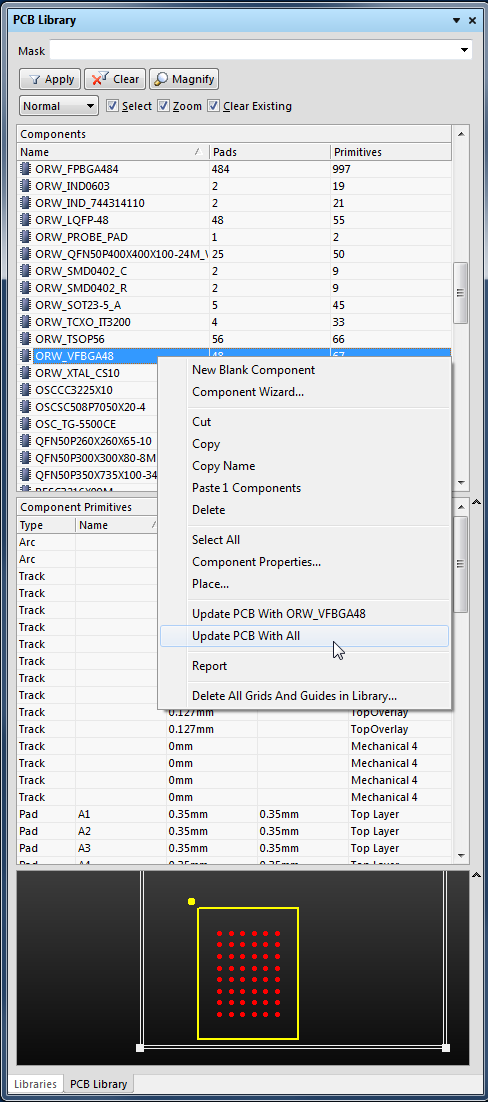
Update PcbDoc From PcbLib

To update a PCB design from a PcbLib.

Open the *.PcbDoc and the *.PcbLib.

Select a Component in the PCB Library Pane, then Right Click to Update PCB with the selected component. 

Or Update the entire PCB with all of the footprints with the same name parts by selecting 'Update PCB with All'.


Typical scenario, you need to update a PCB design and you may not have access to the libraries from which the parts originated.

First create PcbLib from the PcbDoc: Menu >  Design > Make PCB Library

Modify the footprints as need then update the PcbDoc from the PcbLib following the steps described above.

Note that the PCB will be immediately updated without going through an ECO and a Report is not generated. 


Wednesday, August 21, 2013

Routing - Auto Completion

Interactively Routing a Net - English documentation - The Altium Wiki

"The Interactive Router is able to attempt automatic completion (Auto-Complete) of connections to the target pad, hold CTRL and Left Click to instruct the Interactive Router to attempt to complete the current connection. 

This can make routing much faster than placing individual track segments, however, there are some limitations to Auto-Complete feature, as follows: 

Start point and target pad are on the same layer The route can be completed in accordance with design rules (provided that routing conflicts are not being ignored). 

Auto-Complete is available at any time, and you can even CTRL + Click directly on a pad or connection line to route it, there is no need to select it first

You can use Auto-Complete on connections that are partially routed as well. To do this, CTRL + Click on the end of the last track segment or the remaining connection line to complete it to the target. 

 If a connection cannot be auto-completed the tool will return to the last used interactive routing mode."

'via Blog this'

Tuesday, June 11, 2013

Silkscreen to Soldermask Clearance Rules

AD13 Introduced Silkscreen to Soldermask Clearance Rules.

This library part has soldermask defined pads.


3D View


The clearance violations are due to the soldermask defined pads (where soldermask swell is less than the pad size) .


Out of the box rule shown below.

Click on image to view.


Work Around:

Check Clearance to Solder Mask Openings


And use:

(IsText OR IsTrack OR IsArc OR IsFill)
     
OnTopSolderMask Or OnBottomSolderMask 

As shown above I used a 3 mil Clearance rule. If the soldermask swell is 4 mil then this would be the same as a silkscreen to pad clearance rule of 7 mils.


That's It !

Saturday, January 12, 2013

DDR2 Layout Guidelines

Signal Groups

Recommended sequence for routing the DDR2 memory:

1. Route data
2. Route address/command
3. Route control
4. Route clocks
5. Route feedback

The data group is routed first because it operates at twice the clock speed and its signal integrity is the highest priority. The data group represents the largest number of traces within the memory bus and has the strictest trace matching requirements.

The address, command and control lines  have a relationship to the clock. The effective clock length needs to equal to the longest route within this group. 

The designer should perform simulation and construct system timing budgets to ensure that these relationships are properly satisfied. 

Source Freescale AN2910: 
Hardware and Layout Design Considerations for DDR2 SDRAM Memory Interfaces


DDR2 Differential Clock

DDR2 features differential clock inputs (CK and CK#). This differential clock is used to capture command and address, the nominal length is related to the address/command group. 


Differential clocks lines should be routed to achieve the target differential impedance. Routing signals differentially reduces the flight time of the clocks  compared to the single-ended signals. DDR2 design guides recommend that this clock signal be routed at the same length or slightly longer than the address, control and command signals to compensate for this single-ended / differential timing variation.


Source EET Asia:
DRR2 - Get it Right the First Time


Wednesday, December 12, 2012

PCB - Differential Pairs

AD13 Differential Pair Rules defined in the PCB.


Add Class


Add, Delete or Edit Pairs


Select Positive and Negative Nets and Enter Name

Tuesday, November 20, 2012

OutJob - Combine PDFs

PDFs can be combined in OutJobs.

The order of the combined outputs is controlled by the order of selection, see mouse pointer in the screen shot below.