Signal integrity simulation before, during and after PCB design:
'via Blog this'
Saturday, September 28, 2013

Friday, September 20, 2013
Grid Settings - Easy on the Eyes
The default bright white grid lines and dots are a bit distracting and hard on the eyes.
For a softer look that is easier on the eyes the color setting for the grid lines and dots can the adjusted.
Select Ctrl + G to bring up the Cartesian Grid Editor dialog.
As shown I have set the Dots to a med gray (color 34) and the Lines to a light shade of black (color 38).

Here is what the results look like.
Click on Image to View
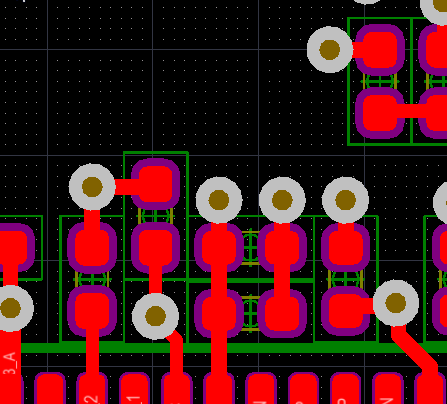
For a softer look that is easier on the eyes the color setting for the grid lines and dots can the adjusted.
Select Ctrl + G to bring up the Cartesian Grid Editor dialog.
As shown I have set the Dots to a med gray (color 34) and the Lines to a light shade of black (color 38).
Here is what the results look like.
Click on Image to View
Thursday, September 19, 2013
Toolbars - Move to Another PC
Refer to Link: Altium Forum Search:
C:\Users\username\AppData\Roaming\AD {<GUID>}
Where GUID is a long Set of Hex characters.
Use File Search if needed to locate the files shown below on your computer.
Copy the following files and paste it to the same location on your new PC.
DXP.RAF
DXP.RCS
UserTools.TLT
Altium has to be closed, during this precedure, or else your copied files will be overwritten.
These files are overwritten when Altium is Closed.
If you are frequently updating your Toolbars, then Synctoy can be used to simplify this task.
'via Blog this'
C:\Users\username\AppData\Roaming\AD {<GUID>}
Where GUID is a long Set of Hex characters.
Use File Search if needed to locate the files shown below on your computer.
Copy the following files and paste it to the same location on your new PC.
DXP.RAF
DXP.RCS
UserTools.TLT
Altium has to be closed, during this precedure, or else your copied files will be overwritten.
These files are overwritten when Altium is Closed.
If you are frequently updating your Toolbars, then Synctoy can be used to simplify this task.
'via Blog this'
Update Schematic from Library
Altium BugCrunch #839 :
Position of refdes after update from library.
Position of refdes after update from library.
- Open SCH List Panel. Select All Objects > Include only Parts.
- Copy current Orientation, and Mirror-status to a spreadsheet.
- Set to 0 and non-mirrored.
- Perform library update.
- Copy spreadsheet data over SCH List data to recover original positions.
Friday, September 13, 2013
Excel - Conditional Formatting for Matched Net Lengths
Below is an example of using Green / Red (Go / No-Go) Conditional Formatting in Excel for checking matched trace length requirements.

Example


Example

Subscribe to:
Posts (Atom)