Here's what changed in AD14.3.14 (released on Aug 25, 2014)
Release Notes for Altium Designer Version 14.3 | Online Documentation for Altium Products:
'via Blog this'
Thursday, August 28, 2014

Wednesday, August 27, 2014
Polygon Cutouts - Altium Discussion Forums
Polygon is wrongly poured over polygon cutout - Altium Discussion Forums:
Workaround for Polygon Cutouts in AD14.3.14
"I tried this with a new, blank board.
I placed a polygon and then, a polygon cutout inside. The polygon cutout is not working. Then i have changed it to board cutout, and it works as expected. When i change it back to polygon cutout again, it works !!!
By the way, I found out, that it works, if you move the polygon."
Source:
http://forum.live.altium.com/posts/204342/573029
'via Blog this'
Workaround for Polygon Cutouts in AD14.3.14
"I tried this with a new, blank board.
I placed a polygon and then, a polygon cutout inside. The polygon cutout is not working. Then i have changed it to board cutout, and it works as expected. When i change it back to polygon cutout again, it works !!!
By the way, I found out, that it works, if you move the polygon."
Source:
http://forum.live.altium.com/posts/204342/573029
'via Blog this'
Tuesday, August 26, 2014
Rooms - For Clearance Exceptions
Rooms are useful for creating exceptions.
For example this Ethernet design called for 18 mils of clearance from the differential pairs to adjacent copper pours.
The diff pair nets were placed in class and a clearance rule was created to hold polygon pours back 18 mils.
click on images to view

This took care of the 18 mil (~3 x W) copper clearance requirement.
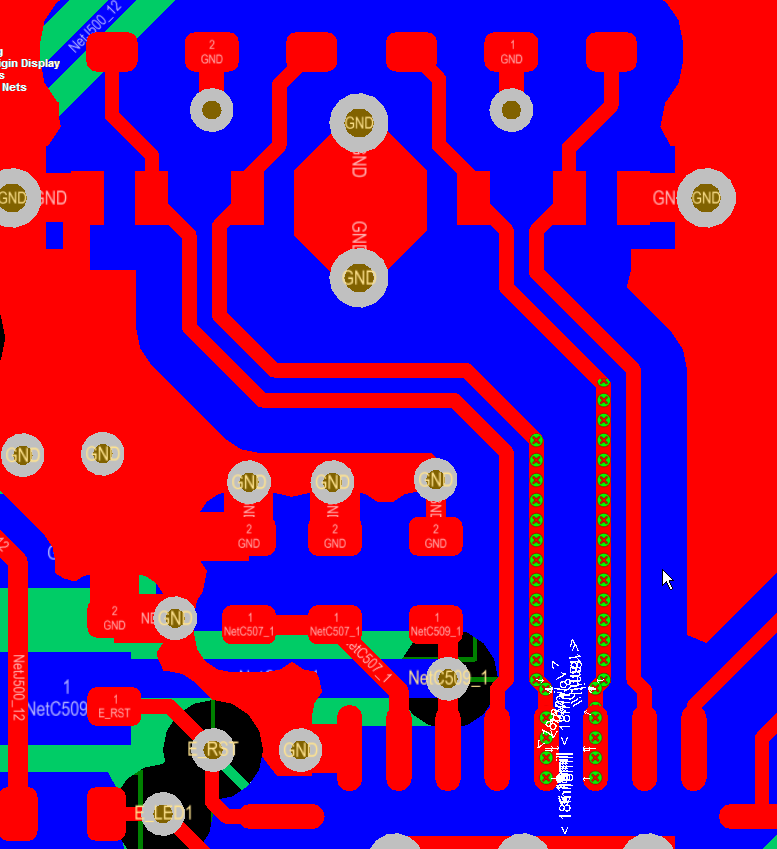
However as shown above, now there is a clearance error where the differential pairs connect to U500.
We can use a room to define a clearance exception for the differential pair at U500.
Define the Room
Design > Rooms

Tip: Use Shift + Click to Select an Existing Room
Tip: Select a handle on the Room > Drag Handle > Tab Key
Take note of the settings used for the room above, specifically:
Name RX_TX_ROOM
Not InComponent('U500')
'Keep Objects Outside'
Clearance Rule

That's It.
For example this Ethernet design called for 18 mils of clearance from the differential pairs to adjacent copper pours.
The diff pair nets were placed in class and a clearance rule was created to hold polygon pours back 18 mils.
click on images to view
This took care of the 18 mil (~3 x W) copper clearance requirement.
However as shown above, now there is a clearance error where the differential pairs connect to U500.
We can use a room to define a clearance exception for the differential pair at U500.
Define the Room
Design > Rooms
Tip: Use Shift + Click to Select an Existing Room
Tip: Select a handle on the Room > Drag Handle > Tab Key
Take note of the settings used for the room above, specifically:
Name RX_TX_ROOM
Not InComponent('U500')
'Keep Objects Outside'
Clearance Rule
That's It.
Monday, August 25, 2014
Drill Chart Properties
Selecting the new Drill Chart Properties can leave you frustrated.

Right Click the upper left handle in the table's corner to bring up the properties dialog.

Please let me know if you have a better method.
That's it.
Monday, August 18, 2014
Importing and Exporting Rules
Use Import and Export Rules to move your favorite rules between projects.
Importing and Exporting Rules | Online Documentation for Altium Products:
'via Blog this'
Importing and Exporting Rules | Online Documentation for Altium Products:
'via Blog this'
Subscribe to:
Posts (Atom)