How to add a custom button to Toggle Fitted / Not Fitted Parts
How to select Variants - Altium Forum
That's it !
Thursday, August 22, 2019

Copper Cleanup 'No Nets'
Copper Rework Cleanup: Updated Jan 11, 2025
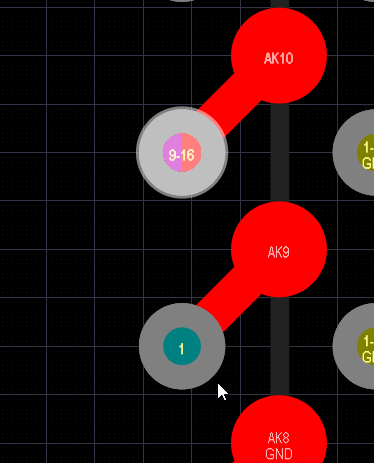
To keep an intentional Via Antenna convert the via to a free pad using Tools > Convert.


Tips:
NOT IsBoardCutoutRegion AND NOT InAnyComponent and ((OnSignal AND (ObjectKind = 'IsPolygon') AND NOT InAnyNet) OR (OnSignal AND (ObjectKind = 'Track') AND NOT InAnyNet And (Keepout = 'False')) OR (OnSignal AND (ObjectKind = 'Arc') AND NOT InAnyNet And (Keepout = 'False')) OR (IsVia AND NOT InAnyNet And (Keepout = 'False')) or (OnSignal AND (ObjectKind = 'Region') AND NOT InAnyNet And (Keepout = 'False')) AND NOT InAnyComponent AND NOT (IsCutoutRegion = 'True')) or (ObjectKind = 'Region') AND (Area='0 sq.mm')
DRCs:
(Istrack or isVia or isArc) and OnSignal And Not InAnyComponent And HasViolations
Un-Routed Net Constraint: Region (0) . . . Dead Copper
(ObjectKind = 'Region') AND (Area='0 sq.mm')
Copper Cutouts:
(ObjectKind = 'Region') And (IsCutoutRegion = 'True')
Routing Filters:
((Istrack or isVia or isArc) and OnSignal And (Net = 'No Net') And Not InAnyComponent)
((Istrack and OnSignal ) or isVia ) And (Net = 'No Net')
((IsArc and OnSignal ) or isVia ) And (Net = 'No Net')
((Istrack or isVia or isArc) and OnSignal And (Net = 'No Net') And Not InAnyComponent)
((Istrack and OnSignal ) or isVia ) And (Net = 'No Net')
((IsArc and OnSignal ) or isVia ) And (Net = 'No Net')
Planes:
(ObjectKind = 'Split Plane') And (Net = 'No Net')
To keep an intentional Via Antenna convert the via to a free pad using Tools > Convert.
Select Long Routed GND Tracks
(ObjectKind = 'Track') And (Net = 'GND') and TraceLength > AsMils(50)
Select Short Routed GND Tracks
(ObjectKind = 'Track') And (Net = 'GND') and TraceLength < AsMils(50)
Select Long Routed PWR Class Tracks
(ObjectKind = 'Track') And (TraceLength > AsMils(50)) AND InNetClass('PWR')
Select Short Routed PWR Class Tracks
(ObjectKind = 'Track') And (TraceLength < AsMils(50)) AND InNetClass('PWR')
Select Tracks to Miter where Miter Ratio = 5 and Track width = 5 mils.
(ObjectKind = 'Track') and TraceLength > AsMils(25) and OnSignal
To Find small bits of tracks
First Clean All Nets using Design > Netlist > Clean All Nets
(ASmm(SQRT((X2-X1)*(X2-X1)+(Y2-Y1)*(Y2-Y1))) = 0) and OnCopper
Optional - And NOT InAnyNet
When using < 0.2 You can Break Connectivity
(ASmm(SQRT((X2-X1)*(X2-X1)+(Y2-Y1)*(Y2-Y1))) < 0.2) and OnCopper
Tips:
Do Not Use
(ASmm(SQRT((X2-X1)*(X2-X1)+(Y2-Y1)*(Y2-Y1))) < 0.2) and OnCopper
Try Using
(ASmm(SQRT((X2-X1)*(X2-X1)+(Y2-Y1)*(Y2-Y1))) <= 0.1) and OnCopper
Rinse and Repeat as Needed to Achieve Desired Results
That's it !
Friday, August 2, 2019

Wednesday, May 22, 2019
Pushing Tracks
Pushing tracks in Altium can be frustrating.
Try selecting the all of tracks you wish to push, hit the tab key to get all of track segments selected, then use Route > Retrace Selected.
Now try to push the tracks.
Now try to push the tracks.
That's it !
Wednesday, March 13, 2019
How to Control Switching Signals with Terminations for Best Signal Quality - Altium
Altium Blog and Lee Ritchley
Transmission Line Terminations, Overshoot and Undershoot (Ringing).
How to Control Switching Signals with Terminations for Best Signal Quality - Altium
That's it !
Transmission Line Terminations, Overshoot and Undershoot (Ringing).
How to Control Switching Signals with Terminations for Best Signal Quality - Altium
That's it !
Subscribe to:
Posts (Atom)